Your information is handled with care: our system records your details at payment, encrypts them to prevent leaks, and uses them only to deliver your Microsoft Installing and Configuring Windows Server 2012 (070-410 Korean Version) files and updates.
Microsoft 070-410 Korean Exam Syllabus Topics:
| Section | Weight | Objectives |
|---|---|---|
| Topic 1: Configure Hyper-V | 15% | |
| Topic 2: Configure server roles and features | 15% | |
| Topic 3: Deploy and configure core network services | 15% | |
| Topic 4: Create and manage Group Policy | 15% | |
| Topic 5: Install and configure servers | 17% | - Configure local storage - Configure servers - Install servers |
| Topic 6: Install and administer Active Directory | 15% |
Answers for 070-410 Korean Candidates
We keep our pricing preferential for candidates and run sales promotions on unfixed dates, often around major festivals. Regular customers across many countries already watch the site for these offers, and keeping an eye on the ExamTorrent homepage is the easiest way to buy Microsoft Installing and Configuring Windows Server 2012 (070-410 Korean Version) at a friendlier price.
070-410 Korean requires 700 (approx.) to pass, and the official exam fee is USD 150. Knowing both numbers early helps you plan your exam date and budget together.
Everything runs online. As soon as you pay, our system records your information, encrypts it to protect your personal details from leaking, and sends the Microsoft Installing and Configuring Windows Server 2012 (070-410 Korean Version) files to your registered email. The whole process takes only a few minutes, so you can begin studying almost immediately after payment.
The 070-410 Korean exam contains Approx 50-60 questions within 120 minutes minutes. Rehearsing under the same time limit on the ExamTorrent engine builds the pacing habits you will need.
- Configure Hyper-V (15%)
- Deploy and configure core network services (15%)
- Install and administer Active Directory (15%)
Allocate your study hours in proportion to each topic's weight.
The package includes 498 practice questions for the 070-410 Korean exam, all with verified answers and available in three formats.
Basic Windows Server and networking knowledge recommended
Microsoft Installing and Configuring Windows Server 2012 (070-410 Korean Version) Sample Questions:
네트워크에 contoso.com이라는 Active Directory 도메인이 있습니다.
귀사는 여름에 500 명의 임시 직원을 고용합니다.
인사 부서는 임시 직원 목록이 포함 된 Microsoft Excel 문서를 제공합니다.
500 명의 임시 직원에 대한 사용자 계정 작성을 자동화해야 합니다.
어떤 도구를 사용해야 합니까?
- A. Active Directory 사용자 및 컴퓨터
- B. ADSI 편집
- C. Add-Member cmdlet
- D. csvde.exe 명령
Correct Answer: D 🗳️
Explanation: Only visible for ExamTorrent members. You can sign-up / login (it's free).
네트워크에는 두 개의 도메인이 포함 된 Active Directory 포리스트가 있습니다. 포리스트에는 5 개의 도메인 컨트롤러가 있습니다. 도메인 컨트롤러는 다음 표와 같이 구성됩니다.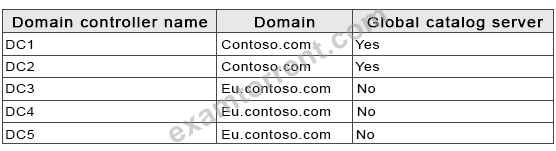
DC5를 글로벌 카탈로그 서버로 구성해야 합니다. 어떤 도구를 사용해야 합니까?
- A. Active Directory 사용자 및 컴퓨터
- B. Active Directory 사이트 및 서비스
- C. Active Directory 관리 센터
- D. Active Directory 도메인 및 트러스트
Correct Answer: B 🗳️
Explanation: Only visible for ExamTorrent members. You can sign-up / login (it's free).
Contoso.com에서 관리자로 일합니다. Contoso.com 네트워크는 Contoso.com이라는 단일 도메인으로 구성됩니다.
Contoso.com에는 도메인 명명 마스터 및 스키마 마스터 역할이 설치된 ENSUREPASS-DC01이라는 Windows Server 2012 R2 도메인 컨트롤러가 있습니다. Contoso.com에는 PDC 에뮬레이터, RID 마스터 및 인프라 마스터 역할이 설치된 ENSUREPASS-DC02라는 Windows Server 2008 R2 도메인 컨트롤러도 있습니다.
Contoso.com의 경계 네트워크에서 작업 그룹에 속하는 새 Windows Server 2012 서버를 배포했습니다.
그런 다음 djoin.exe 명령을 실행했습니다.
다음 중 djoin.exe 명령의 목적은 무엇입니까?
- A. 도메인에서 사용자 계정을 설정하고 컴퓨터가 다시 시작될 때 온라인 도메인 가입을 요청합니다.
- B. 도메인에 컴퓨터 계정을 설정하고 오프라인 도메인 가입을 즉시 요청합니다.
- C. 도메인에 컴퓨터 계정을 설정하고 온라인 도메인 가입을 즉시 요청합니다.
- D. 도메인에 컴퓨터 계정을 설정하고 컴퓨터를 다시 시작할 때 오프라인 도메인 가입을 요청합니다.
Correct Answer: D 🗳️
네트워크에 contoso.com이라는 Active Directory 도메인이 있습니다. 도메인에는 Server1이라는 Application Server가 있습니다. Server1은 Windows Server 2012 R2를 실행합니다.
Server1은 FTP 서버로 구성되어 있습니다.
클라이언트 컴퓨터는 App1.exe라는 FTP 응용 프로그램을 사용합니다. App1.exe는 TCP 포트 21을 제어 포트로 사용하고 데이터 포트를 동적으로 요청합니다.
Server1에서 TCP 포트 21에서 연결을 허용하는 방화벽 규칙을 만듭니다.
App1.exe에서 클라이언트 연결을 지원하도록 Server1을 구성해야 합니다.
어떻게 해야 합니까?
- A. netsh advfirewall set global statefulftp enable을 실행하십시오.
- B. App1.exe를 허용하는 인바운드 방화벽 규칙을 만듭니다.
- C. 터널 연결 보안 규칙을 만듭니다.
- D. Set-NetFirewallRule -DisplayName DynamicFTP-프로필 도메인 실행
Correct Answer: A 🗳️
Explanation: Only visible for ExamTorrent members. You can sign-up / login (it's free).
Contoso.com에서 관리자로 일합니다. Contoso.com 네트워크는 Contoso.com과 test.com이라는 두 개의 Active Directory 포리스트로 구성됩니다. 포리스트간에 구성된 트러스트 관계가 없습니다.
test.com 도메인의 GPO (그룹 정책 개체) 백업은 Contoso.com 도메인의 도메인 컨트롤러에 저장됩니다.
Contoso.com 도메인에서 GPO를 만들어야 하며 test.com 도메인의 GPO 설정을 기반으로해야 한다는 메시지가 표시됩니다.
New-GPO Windows PowerShell cmdlet을 사용하여 새 GPO를 만드는 것으로 시작합니다. Windows PowerShell cmdlet을 통해 작업을 완료하려고 합니다.
다음 중 어떤 조치를 취해야 합니까?
- A. Import-GPO Windows PowerShell cmdlet 사용을 고려해야 합니다.
- B. Invoke-GPUpdate Windows PowerShell cmdlet 사용을 고려해야 합니다.
- C. Copy-GPO Windows PowerShell cmdlet 사용을 고려해야 합니다.
- D. New-GPLink Windows PowerShell cmdlet 사용을 고려해야 합니다.
Correct Answer: A 🗳️
Explanation: Only visible for ExamTorrent members. You can sign-up / login (it's free).
Viewing page 1 out of 100 pages.
Viewing questions 1-5 out of 498 questions.